 Ironstone
AI websites look the same because the tool gets little about the business. So for every gap, it picks the safest common choice: the same sections in the same order, stock photos, and lines like "quality service" that fit anyone. The fix is to feed it what only this business has: the customer it wants more of, its real listing and reviews, the owner's photos and its own words. Then you cut what nobody reads and check every fact. This guide walks through eight steps, with screens from our app.
Key facts
- Lead finder, our business lookup tool, showed partners 56 businesses with a gap between October 8 and November 17, 2026, and 6 of them had a website whose newest year was 2021 or earlier, in Ironstone's own records (our own accounts left out). 1
- In Pew Research Center's June 2025 survey, 76% of Americans said it's extremely or very important to be able to tell whether pictures, videos and text were made by AI or by people. 4
- In Pew Research Center's June 2025 survey, 53% of Americans said they're not too or not at all confident they can tell whether something was made by AI or by a person. 4
- From December 2025 to May 2026, 17% to 20% of US businesses used AI, and 20% to 23% expected to within six months, in the Census Bureau's Business Trends and Outlook Survey. 5
Why do all AI websites look the same?
AI websites look the same because the tool knows the business type, not the business. Give it a name and a type, and it repeats the pattern that fits the widest range of sites. You get a banner photo, three service boxes, a quote and a contact form. Nothing's wrong with any one part. Together, though, they read like every other website in town.
When the tool has no real detail, it covers the gap with safe words: trusted, quality, passionate, your local experts. Safe words fit every business, so they describe none of them. And no stock photo shows the owner's van, counter or chair. The result looks finished. It still feels like nobody's website.
- It gets a business name and a type, and little else to work with.
- It covers every gap with phrases that fit any business in any town.
- It reaches for stock photos when it has none of the owner's own.
- It uses the same sections in the same order every single time.
The look isn't the tool's fault alone. It comes from what goes in. A partner who builds from the business's own listing, reviews and photos gets a website the owner recognizes, and that's what makes an owner say yes. Our guide on how to sell AI websites to local businesses covers the whole method. This post covers making each one look like theirs.
Does it matter if a website looks generic?
Yes, because customers notice. They want to know whether what they read was made by AI, and many can't tell. A website that could belong to anyone raises that doubt: is there a real business behind this? A website built from the business's own words, photos and facts answers it before anyone asks. Three figures below back each part of this: two from a Pew Research Center survey on what people want to know and whether they can tell, and one from the Census Bureau on how many businesses use AI.
Of Americans say it's extremely or very important to be able to tell whether pictures, videos and text were made by AI or by people, in Pew Research Center's June 2025 survey. So build each website from the owner's real photos and words, and customers won't have to guess. 4
Of Americans aren't too or not at all confident they can tell whether something was made by AI or by a person, in Pew Research Center's June 2025 survey. So don't count on customers spotting the difference; fill the website with real details from the business that make it plain. 4
Of US businesses used AI from December 2025 to May 2026, and a larger share expected to within six months, in the Census Bureau's Business Trends and Outlook Survey. As more owners hear about AI website tools, show each owner how the website you built uses their own words and photos. 5
In the Census Bureau's 2022 Nonemployer Statistics, 29.8 million US businesses had no paid employees. An owner who works alone has no one to rewrite the words or take the photos. There's nobody on staff to notice the website sounds like someone else's. If you, the partner, don't make the website theirs, nobody will. 2
Here's who you'd be building for. Lead finder, our business lookup tool, showed 6 partners 56 local businesses with a gap an owner can see between October 8 and November 17, 2026. We left our own searches out. The table below sorts them by the kind of gap. It counts gaps, not generic-looking websites. It also doesn't count businesses with a working website, because these records don't hold that number. 1
| What Lead finder found | Businesses |
|---|---|
| No website found | 28 |
| An outdated website | 16 |
| Only a social listing | 6 |
| Only a delivery or ordering page | 6 |
Those businesses are the ones you build for. But their customers also see the competitors that already have a working website. Picture two fictional plumbers in Kestrel Bay, WA. Shoreline Plumbing has a working website, and Insley Plumbing has a gap. If Insley's new website could belong to any plumber anywhere, a customer comparing the two has no reason to pick it. If it's built from Insley's own words, photos and facts, it gives them one. Our post on where to find web design clients covers the search. This post covers what you build once you've found them.
What makes an AI website look generic?
A generic AI website gives itself away with a handful of signs: stock photos, filler words like "quality" and "trusted," and no street or town that only this business would name. Each one is easy to spot on a phone. Open any AI-built site and look for them before an owner does. Each sign has a fix in the steps below, so none of them is a dead end.
- A headline that could sit on any business in the same town.
- Stock photos of smiling people who don't work there and never did.
- Three boxes of services, an icon each, with no real detail.
- Quotes or reviews with no real customer behind them at all.
- Words like quality, trusted and passionate with nothing specific after them.
- No street, neighborhood or town named anywhere on the page.
| What you see | Why it happens | What makes it theirs |
|---|---|---|
| A headline any business could use | The tool knows the type, not the business | What they do, where, and for whom, in one line |
| Stock photos | No photos from the owner were given | The owner's own photos of the work, team and front |
| The same sections in the same order | It repeats a pattern that fits almost any site | Only the sections this business's customers use |
| Words like quality and trusted | Safe words fit every business | Their services, their streets, the words from their reviews |
| The call button low on the page | It isn't told what the owner wants more of | The one action customers need, on the first screen |
None of these takes a designer to fix. Each one takes a fact, a photo or a plain-words change. The eight steps below take them in the order you meet them, from before the build to the moment the owner sees the website on a phone.
How do you make an AI website look like the business in 8 steps?
You give the AI what only this business has, then you cut and check. The eight steps below follow one website from the first question to the owner's phone. You'll see screens from our app with fictional businesses. Each step also shows how to do it by hand, with tools anyone can use.
1. Which customer is the website for?
The website is for the customer the owner wants more of, not for everyone. A generic site is written for nobody in particular. That's why it sounds like every other site in town. A plumber wants emergency calls. A bakery wants holiday orders. A salon wants bookings. Once you name that customer, every line on the site has a reason to be there. The lines without a reason go.
Here's the twist: the owner isn't the reader. Owners ask for what they're proud of. Customers want the phone number, the hours and the area served. So ask the owner one thing: what customers ask them on the phone. Their answers become the first screen, because those are the things customers need before they'll call.
Open the business in Google Maps and read the newest reviews. For each one, note the job the customer hired them for, the words they used and what they praised. Three or four words will keep coming back. Those words tell you who the website is for and what it should say first. Write them down in your notes before you build anything.
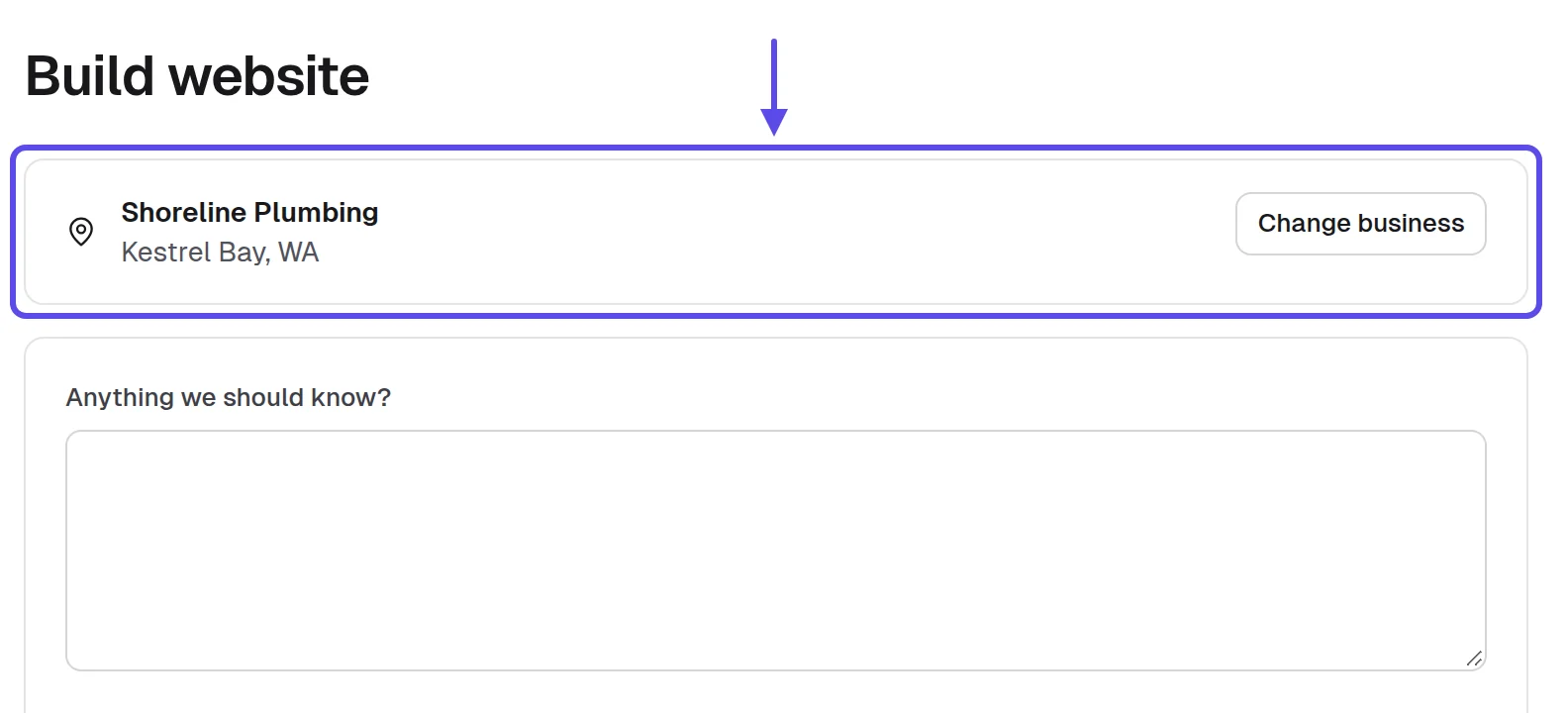
In our build form, you confirm the business details and choose its pages before anything is written. Pick the pages that customer needs, not every page on offer. A bakery needs its menu. A plumber needs its services and a call button. Anything else can wait until the owner asks for it.
- You can name the customer the owner wants more of.
- You know the one action that customer should take.
- You read the newest reviews on the business's listing.
- You noted the words customers repeat in their reviews.
- The pages you chose serve that customer and nobody else.
You can say in one sentence who the website is for and what they should do. For example: "People with a leak in Kestrel Bay who need to call now." If you can't say it that plainly, go back to the reviews.
Tip
Write the customer and the action at the top of your notes. Every later step checks against that one line.
2. What do the listing and reviews already say?
They already say much of what the website needs: the hours, services, area and photos the business has published. AI writes generic lines when it has nothing specific to go on. The more of that real detail you put in, the less the tool has to make up on its own. So start there, every time, before you ask the AI to write a word.
An outdated website still holds facts worth keeping: service names, the owner's name, how the business describes itself. Use its facts, never its look. An owner recognizes their own words on a new website faster than any design. So before you write the old site off, read it through once and save what's true.
Copy the listing's details from Google Maps into a sheet in Google Sheets: name, phone, address, hours and services. Add the review words from step 1 and anything useful the old website says. That gives you one row per business. Treat it as your source of truth for every later step, and check the website against it, not against your memory.
When you start a build from a business in Lead finder, it brings in the public listing and the current website: real hours, services and photos. On our live service, we ran 18 builds between October 21 and November 3, 2026. Of those, 16 finished in under three minutes, and the slowest took about nine and a half minutes. That leaves your time for checking the details.
- Name, phone and address match the listing.
- Opening hours copied from the listing.
- Services named the way the business names them.
- Review words saved in your sheet.
- Useful facts kept from the old website.
The build form shows real details you recognize from the listing. Your sheet has a row you could read aloud to the owner without a single guess. If any cell says "maybe," it's a question for the owner, not for the AI.
Tip
Confirm the details in the build form before it runs. A fact you fix here never reaches the owner wrong.
3. Where do the real photos come from?
Real photos come from the owner, and from what the owner has already posted. That matters because stock photos are the clearest sign of a generic website, and customers recognize them. The owner's own van, counter or chair tells a customer they've found the right place. A stock photo can't do that, however polished it looks, because it shows somewhere else.
A plain phone photo of the real shop front or the real work does more than a polished stock photo. Customers want to know what they'll see when they arrive. A photo of the front door helps someone find it. A photo of a finished job shows what they'll get. Don't wait for perfect light.
Start with photos the owner posted on their Google Business Profile, and ask before you use them. Then ask the owner to text a few from their phone: the front, the work and the team if they like. Photos posted by customers belong to those customers, so leave them out. If you're not sure who took a photo, don't use it.
Asking for their photos
Hi [Owner name],
This is [Your full name] from [Your business name], and the website for [Business name] has placeholder photos for now.
Please text me three or four photos from your phone: the front, your work, and the team if you're happy to.
I'll put them on the website the same day and send you the link.
[Your full name], [Your business name], [your phone number]
The photos a build brings in show in the build form, where you can keep or drop each one. Drop any photo that shows people who don't work there. After the website goes live, the owner can send new photos from their own login with Ask for changes. That way the photos keep getting more theirs over time.
- No stock photo shows people as their staff.
- The shop front or work photo comes first.
- You asked before using any photo they posted.
- Customer photos left out of the website.
- The photo request sent the day you visit.
The owner looks at the website, points at a photo and says, "That's our place." When that happens without any prompting, the photos are doing their job. If they ask whose shop that is, swap the photo.
Tip
If a stock photo has to stay for now, pick one of the work, never of people. A stranger's smile passed off as staff is the fastest way to look fake.
4. What should the first screen show?
The first screen should show what the business does, where, and the one action from step 1. Many AI websites open with a large photo and a slogan instead. On a phone, that first screen is all a customer sees before they decide to scroll or leave. If it only says something nice, they still don't know whether they've found the right place.
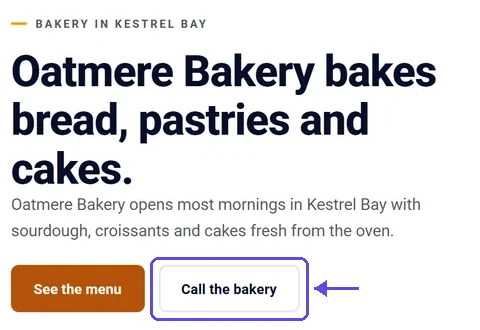
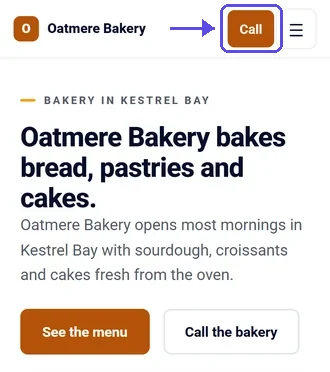
Judge the first screen on a phone, not a laptop. That's where many customers will see it. Check that the call button sits where a thumb can reach it without stretching. And put today's hours on the first screen, because they answer the question many customers call to ask. It saves them a call.
Open the website on your own phone and count the seconds until you could call. Then run the website's address through PageSpeed Insights to see how it does on a phone. A heavy banner photo is often what slows it down. Cutting it helps the look too, because the first screen shows facts instead of a picture that could be anywhere.
In our app, ask for the change in plain words, such as "put the call button and today's hours at the top." The website updates in a few minutes. Then compare it on a desktop and on a phone, as the two screens below show. The phone view is the one that counts.
First-screen change request
For [Business name]: replace the slogan with what the business does and the town it's in. Put the call button and today's hours on the first screen, and use the shop front photo.
- What they do and where, in one line.
- The call button reachable with a thumb.
- Today's hours visible without scrolling.
- No slogan that fits another business.
- Loads quickly on your own phone.
Someone who's never heard of the business can say what it does, where it is and how to reach it after one look at the first screen. If they need to scroll to answer any of the three, keep working on it.
Tip
Hand your phone to someone nearby for five seconds and ask what the business does. If they can't say, change the first screen.
5. Which sections can you cut?
Cut every section a customer wouldn't miss. Generic websites carry them all: a "why choose us" block, a mission statement, a features grid, a quote slider and questions nobody asked. A short website with only what customers use looks made for the business. Every extra block makes it look more like a template and less like a place you can visit.
It sounds backward, but cutting makes a website look more real, not less. An empty-sounding section tells a customer nobody wrote it. A diner with hours, a menu and a phone number looks more like itself than a diner with ten sections. Fewer sections also means fewer places for a wrong fact to hide.
Open the website in Google Chrome on your laptop, switch to the phone view and scroll from top to bottom. For each section, ask yourself whether a customer would miss it. Note the keepers and the cuts in your sheet before you ask for any change. That way you send one clear request instead of five small ones, and you can explain each cut to the owner.
In our app, describe the cut in plain words in the change box. It shows what it will use before it runs, so you can catch a mistake first. The website updates in a few minutes, and we keep the older version in case you want it back.
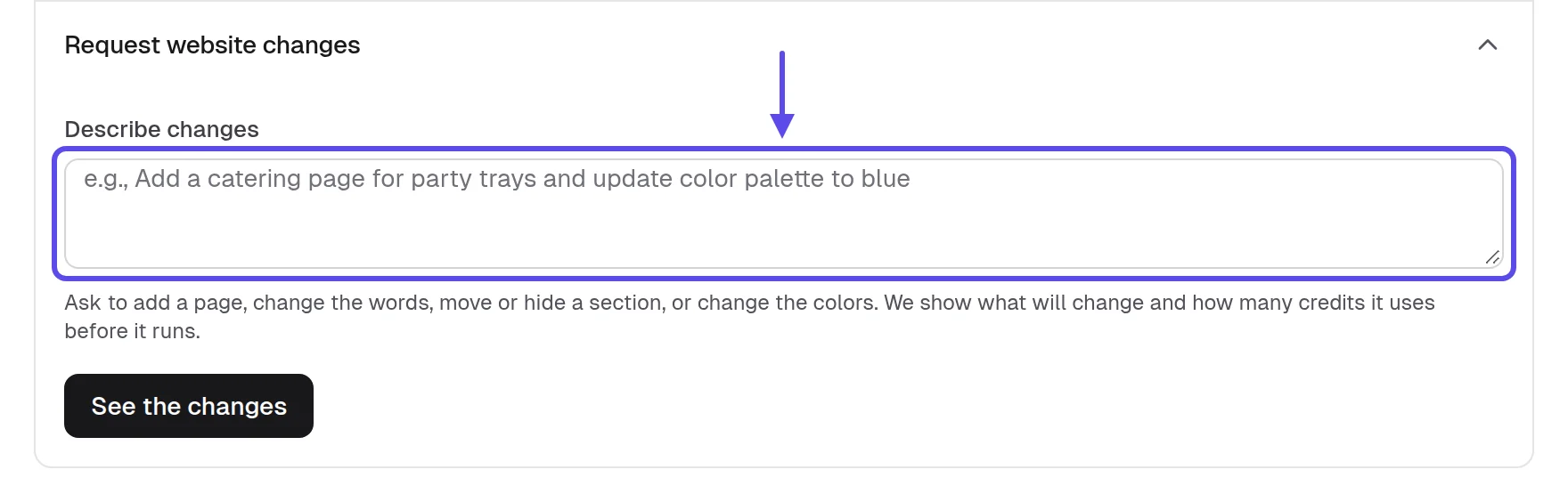
Cutting sections request
For [Business name]: remove the "why choose us" section and the quotes with no real customer behind them. Keep services, hours, photos and contact, in that order.
- Every section is something a customer would miss.
- No quotes without a real customer behind them.
- No mission statement the owner never wrote.
- Contact details reachable from every page.
- Cuts noted in your sheet first.
On a phone, the website takes a few short scrolls. Every section answers something a customer of this business would ask. If you find a section you can't explain to the owner in one sentence, it's probably another cut.
Tip
When you're unsure about a section, cut it. Adding it back later takes a sentence, and an owner rarely asks for one.
6. Which words would only this business use?
The words only this business would use are its services, its streets and towns, the owner's name and what customers wrote in reviews. Adjectives fit any business. These details fit one. So go through the website line by line and swap one for the other. Each swap makes the page sound less like a template and more like the place customers already know.
Delete adjectives, add nouns. If a line could go on a competitor's website down the street, rewrite it. "Quality work" says nothing about anyone. The job, the place and the customer's own words say who the business is. A street name or a service name only fits the business it belongs to.
Paste the website's words into Google Docs and highlight every line that could fit another business. Then rewrite each one with a detail from your sheet: a service name, a neighborhood or a word from a review. Work down the page one line at a time. The table below puts a generic line next to a rewrite you can copy, for four fictional local businesses.
| Generic line | A line only they could use |
|---|---|
| We offer quality plumbing services | Insley Plumbing, a fictional plumber: "Leaks, clogs and water heaters fixed across Kestrel Bay, WA." |
| Fresh baked goods made with love | Oatmere Bakery, a fictional bakery: "Sourdough and cinnamon rolls, baked each morning. Customers call them 'still warm.'" |
| Your trusted auto experts | Ridgeway Auto Repair, a fictional shop: "Brake jobs and tire rotations, done by the crew reviews call 'honest.'" |
| A great place to eat | Harbor Light Diner, a fictional diner: "Today's hours are up top. Come try the pancakes our customers keep mentioning." |
In our app, ask for the rewrite in plain words and name the details to use. The website updates in a few minutes. Every change is saved as a version, so you can try a bolder rewrite and go back if it doesn't sound like the owner. That makes it safe to experiment.
Rewriting words request
For [Business name]: replace words like quality and trusted with the services they list. Name [Town] and [Neighborhood] where they fit, and use the review words [Word 1] and [Word 2].
- No line could sit on a competitor's website.
- The town and neighborhoods named where they fit.
- Services named the way the owner says them.
- A few words borrowed from real reviews.
- Adjectives with nothing behind them deleted.
Cover the business name and read the words aloud. Anyone who knows the business can still tell whose website it is. If the words could belong to the shop down the street, go back through your sheet for more details.
Tip
Read the website out loud the way the owner would say it. Any line they'd never say is a line to change.
7. How do you check every fact and keep the version that works?
Read every fact against your sheet before anyone sees it, and keep each version so a good one is never lost. A website that looks like theirs but shows the wrong hours still fails the customer who trusts it. That customer shows up to a locked door, and the owner is the one who hears about it. Looking right and being right have to come as a pair.
The riskiest lines are the ones that sound best. AI may add a claim nobody told you, such as round-the-clock service, an award or years in business. Delete any claim the business didn't publish or the owner didn't confirm. Never invent reviews. A line that sounds impressive and turns out false does more harm than a plain one.
Paste the old website's address into the Wayback Machine to see what the business has said about itself over time. Compare that with the listing and your sheet. Anything that disagrees, such as hours or services, is a question for the owner, not a guess. Write those questions down and ask them all at once, so you don't keep coming back with one at a time.
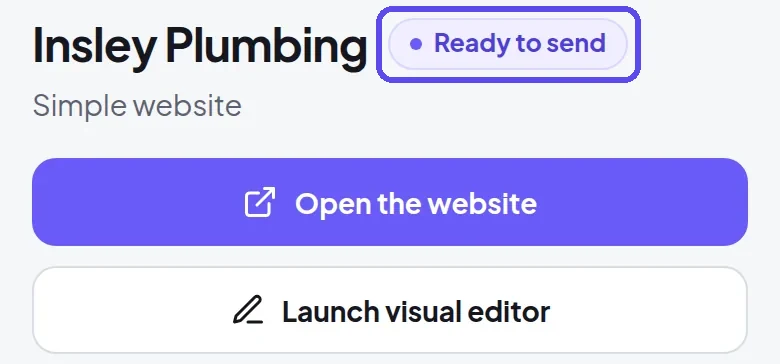
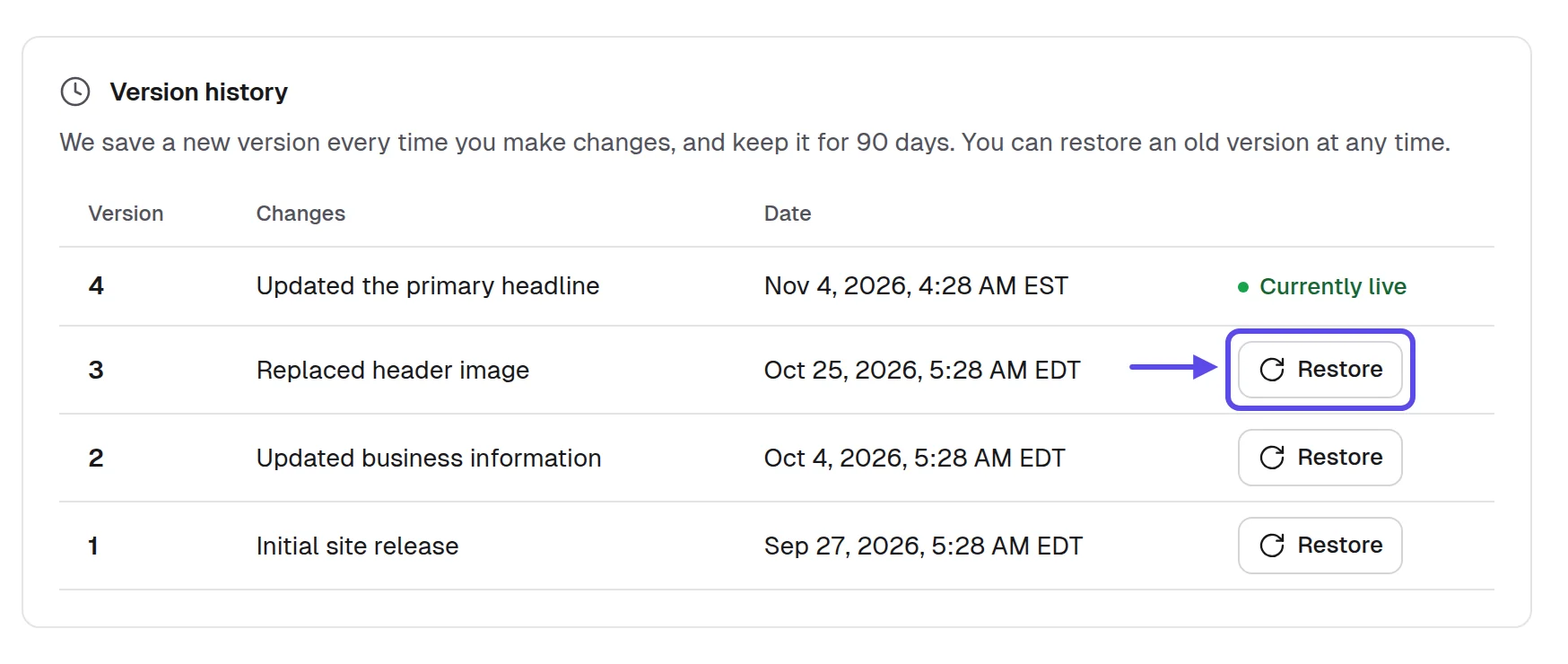
In our app, every change is saved as a version you can bring back. The History shows each version, with the live one marked and Restore beside the older ones. When every fact checks out, the website is marked Ready to send. That's your signal it can go to the owner.
- Every fact matches the listing and your sheet.
- No claim the business didn't publish.
- No review, award or year made up.
- Questions for the owner listed, not guessed.
- The version you liked is easy to find.
You could point at any line on the website and say where it came from: the listing, a review, the owner or the old site. And the website is marked Ready to send.
Tip
Check facts last, after every change. A rewrite in step 6 can bring back a claim you deleted in step 5.
8. How do you show the owner it's theirs?
Show it on a phone and point at their own details first: their hours, their photo, a word from their reviews. Owners decide quickly whether a website looks like their business, so lead with what they'll recognize. Hand them the phone and say something like, "Here are your hours, right at the top. Your customers keep calling you friendly, so I used that word too." Design talk can wait. In person works best, because the owner holds the website in their own hands. Our guide to sell websites in person covers the visit.
If you can't visit, record a short screen video with Loom that scrolls their website on a phone. Say the business name in the first five seconds. Then stop on one detail only they would recognize, like their hours or a photo of their front. A generic video gets the same reaction as a generic website.
Write one message to one business from your own Gmail. Include their name, the detail you used, the link and the video. Add your full name, business name and mailing address, plus a clear way to say no thanks. In the United States, the FTC's compliance guide to the CAN-SPAM Act says a commercial email must include your valid physical postal address and a clear way to opt out, and opt-out requests must be honored within 10 business days. Other countries have their own rules. 3
Our app writes a first message in your name and lets you send it by email or text, or print a flyer. Every email carries an opt-out line. Follow-ups stop when the business replies, so nobody gets chased after they've answered. Read the message before it goes and add the detail you picked.
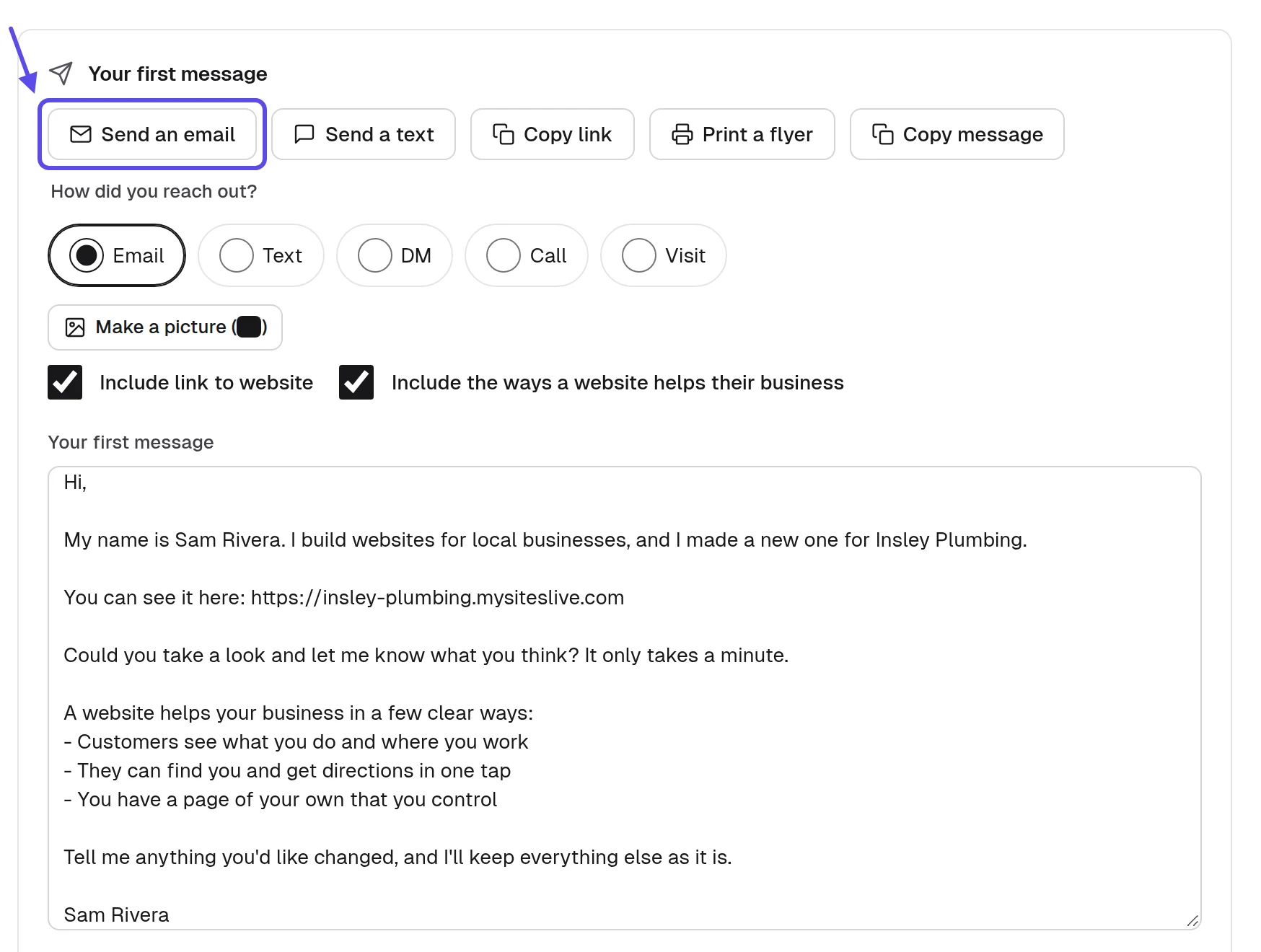
First email with video
Subject: A website made from [Business name]'s own details
Hi [Owner name],
I'm [Your full name] from [Your business name]. I built a website for [Business name] using your own hours, services and the words your customers use in reviews.
Here's the link, [Website link], and a short video, [Video link], that walks through it on a phone.
This is an offer: if you want the website, I can put it live and look after it every month. Anything that doesn't look like you, I'll change.
If you'd rather not hear from me, reply "no thanks" and I won't write again.
[Your full name], [Your business name], [your mailing address]
First text message
Hi, this is [Your full name] from [Your business name], [your phone number], [your address]. I built a website for [Business name] from your own listing and photos, and you can see it here: [Website link]. Reply STOP to opt out.
- Open with their detail, not with design.
- Their business name in the first seconds.
- One business, one message, their own link.
- Your mailing address and an opt-out line.
- Ask what would make it more theirs.
The owner's first reply is about their business: a photo, the hours, a service. It isn't about websites in general. When they start correcting details, they're already picturing it as theirs.
Tip
Ask the owner what's missing before you ask whether they like it. The answer is your next change request.
What do you say when an owner says it looks like every other website?
Agree with them, ask what would make it theirs, and change it while you're there. It's a fair point and a good sign, because it means they care how their business looks. A change in plain words takes minutes. So the owner sees their own idea on the website before you leave.
When it looks generic
That's fair, and it's the reason it's built to change. Tell me the one thing a customer should know about your place that isn't on it yet.
I'll put that on now, on your phone, and you'll see it in a few minutes.
The right questions get the details AI can't guess. Ask what customers ask on the phone, what regulars say and what the owner would want a stranger to see first. The five questions below work at a counter, in a chair or in a truck cab. Keep them short and let the owner talk.
Questions for the owner
Tell me what customers ask you most on the phone.
Tell me which job or dish you want more of.
Tell me what your regulars say about you.
Show me the photo of your place you'd show a stranger.
Tell me if anything on the website isn't true, or isn't how you'd say it.
Write each answer into your sheet and turn it into one change request. An owner who sees their own answer on the website stops comparing it with other websites. Keep the questions handy for the next business of the same type, because the answers will be different.
- Agree with the owner before you explain.
- Ask one question, then listen.
- Make the change while you're still there.
- Show the result on their phone.
- Note every answer in your sheet.
How can you tell your website no longer looks generic?
You know it's working when owners recognize their business on the first look and customers use the website. Count these signs in a sheet as you go. They're things to count, not targets, so don't set a number. Watch which way they move over time.
- Owners say "that's us" before you point anything out.
- Fewer change requests about wrong facts, more about new details.
- Replies that mention a photo, a service or a word you used.
- Owners send their own photos without being asked twice.
- Calls and messages showing in the owner's own login after launch.
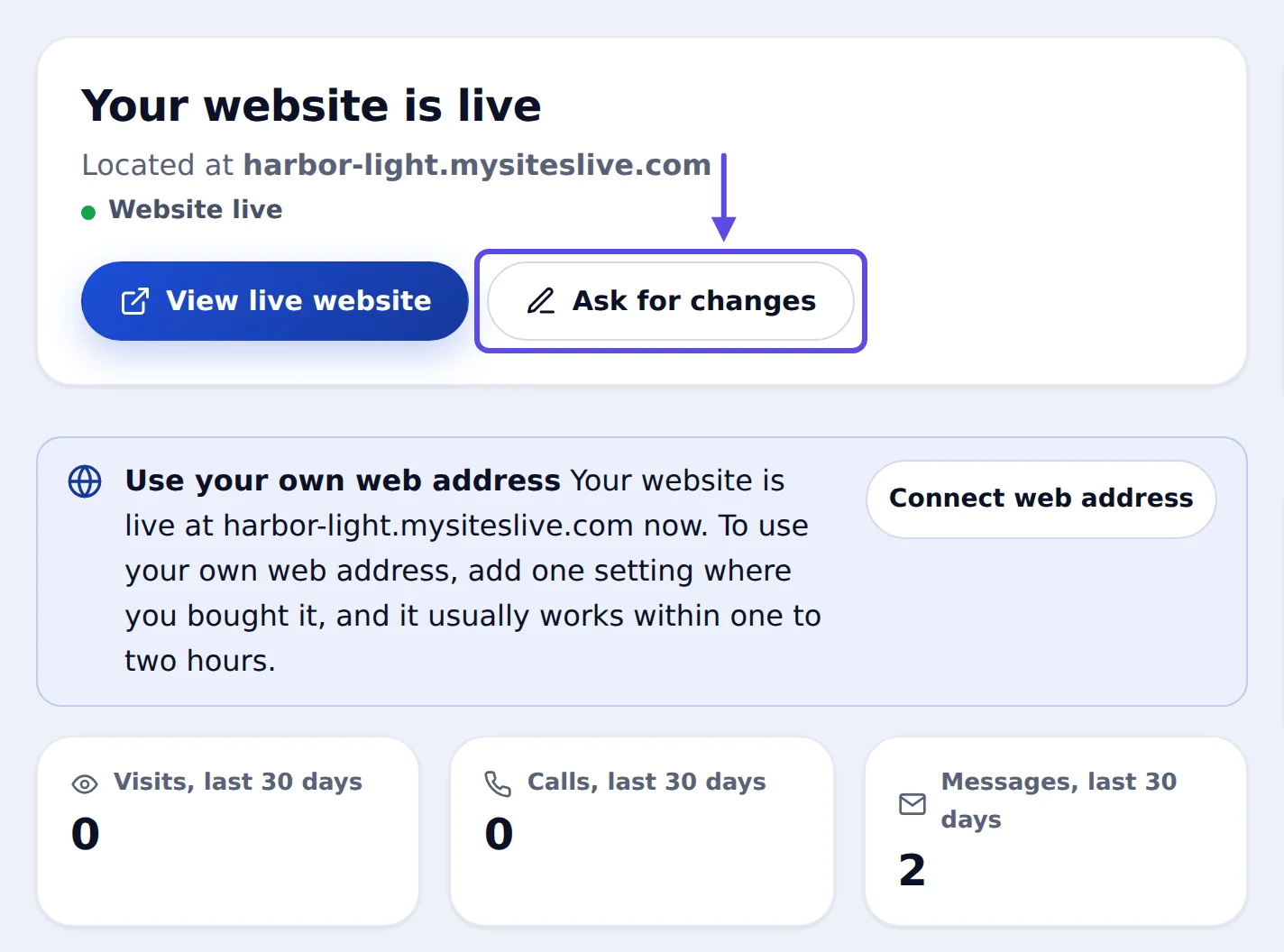
After launch, Google Search Console shows which searches bring up the website. If people find it by searching for the services and streets you named, the specific words are working. When one sign stays weak, fix the step behind it. Few replies means you should change the message in step 8. Owners who see it and still say no need a different way of seeing it, in person or by video. If owners still call it generic, go back to steps 3 and 6. Our post on how to hand over a website covers what comes after the yes.
Frequently asked questions
Can customers tell a website was made with AI?
Customers can tell when a website is generic, not which tool made it. They spot stock photos, words that fit any business and sections nobody reads. A website with the owner's photos, real hours and words from their reviews reads as the business's own, however it was built. That's why the details matter more than the method.
Is a generic website better than no website?
It can be, if every fact on it is right: hours, phone and address. But it won't stand out, and a few plain-words changes make it theirs. A website with made-up details is worse, because wrong information keeps customers away. So check the facts first.
Should I tell the owner the website was built with AI?
Yes, if they ask, answer honestly. What they pay for is the finished website, checked fact by fact against their own details, and someone local who looks after it every month. Be plain about how you work, the same as you would about anything else.
Can I use stock photos on a local business website?
Yes, as a placeholder until the owner's own photos arrive, and never passed off as their team or their work. Check the license terms on the page you got the photo from before you use it. The owner's own photos are always the better choice, so swap them in as soon as they come.
Do I need design skills to make an AI website look like the business?
No. The details do the work: the customer the website serves, its real facts, the owner's photos and words only that business would use. You ask for each change in plain words, and the website updates in a few minutes. If you can describe what's wrong, you can fix it.
Who owns the photos and words on the website?
The business owns its domain and its content: its words, photos, logo, hours and prices. The website runs on your service with your name as the one who made it, not ours, and it stays live for as long as the business pays you monthly. The business can cancel at any time.
How do I stop every website I build from looking the same?
Start every website from that business's own listing, reviews and photos, never from the last one you built. Ask the owner the five questions above and cut what their customers wouldn't miss. Two plumbers with different customers and different streets will end up with different websites.
Sources
- Ironstone, Lead finder’s searches and results for partners (our own accounts left out), October 8 to November 17, 2026, from our own records read November 20, 2026
- US Census Bureau, “Census Bureau Statistics Shed Light on Self-Employment by Sector and State During Small Business Week” (May 6, 2025), on the 2022 Nonemployer Statistics and County Business Patterns
- Federal Trade Commission, CAN-SPAM Act: A Compliance Guide for Business
- Pew Research Center, “How Americans View AI and Its Impact on People and Society” (September 17, 2025; survey of 5,023 US adults, June 9 to 15, 2025)
- US Census Bureau, “Large Firms With at Least 20 Employees Biggest AI Users” (May 26, 2026), from the Business Trends and Outlook Survey