 Ironstone
Selling websites in person works for local businesses when you walk in with the owner's website already built and show it on their phone. Many local businesses are run by an owner who's often at the counter. A visit tells you in minutes what an email never does: what they liked and what stopped them. It takes time, and many owners say no. Below you'll find why it works, when it doesn't, ten steps from the street you pick to the follow-up, the words to use and the rules to know.
Key facts
- In the Census Bureau's 2022 Nonemployer Statistics, 29.8 million US businesses had no paid employees. 1
- In Clutch's 2025 survey, 17% of small businesses still had no website, and over a third of those said a website isn't relevant to them. 2
- Of 460 local businesses that Lead finder, our business lookup tool, checked for partners between October 19 and November 6, 2026, in 6 towns and 30 business types, 85 had a gap an owner can see, such as no website it could find or an outdated one. 3
- In a 2025 survey of more than 1,000 people reported by CX Dive, 83% of US consumers had used a search engine to find a local business in the past month. 4
What selling websites in person looks like
Selling websites in person looks like a short visit at a quiet hour: you hand the owner their own finished website on their phone, let them scroll, answer their questions and ask for a yes. It works when the owner can see a finished website for their own business, and it fails when you walk in with a business card and a promise. The visit isn't where you build trust from nothing. It's where you show something real.
Here's what a visit looks like. You walk into a bakery mid-afternoon and ask for the owner. You say one sentence about what customers can't find today, then hand over your phone with their new website open. Five minutes, sometimes less. The owner scrolls, frowns at something, smiles at something. You learn more in that moment than from a week of unanswered emails.
Building a website used to take days, so walking in meant selling a promise. In 2026, AI builds a finished website from a business's public listing in minutes. You can build ten before lunch and walk in with every one. The build stopped being the hard part. Showing it to the owner is the skill now.
Why walking in works for local businesses
Walking in works because you meet the person who decides, face to face, with their own business on a phone in front of them. A local business is a person before it's a company, and that person is often the one behind the counter, under the hood or at the chair. They rarely read cold email from strangers, but they'll look at their own business on a phone for a minute. Four figures explain why.

US businesses had no paid employees in the Census Bureau's 2022 Nonemployer Statistics. In businesses like these, the person you meet is usually the owner. 1
of small businesses still had no website in Clutch's 2025 survey. Over a third of those say a website isn't relevant to them, and a finished one on their phone answers that better than any argument. 2
of 460 local businesses that Lead finder, our business lookup tool, checked for partners between October 19 and November 6, 2026, had a gap an owner can see: no website found, an outdated website, only a social listing or only a delivery page. Those are the doors worth walking through. 3
The same Census Bureau story counts 8.3 million US businesses with paid employees in 2022, from its County Business Patterns. So a business with no paid staff is far more common than one with employees, and even in a shop with staff, the person who decides is often there in person. 1
A survey of more than 1,000 US consumers reported by CX Dive in 2025 found that 83% had used a search engine to find a local business in the past month. So customers search first, and the owner who decides is usually close at hand. 4
A visit gives you what a message can't. The owner sees it's real, because you're standing there. You see their face when they find the call button. You hear the objection in their own words and answer it on the spot. And you can send the approval link before you leave, while the yes is fresh.
When selling in person doesn't work
Selling in person doesn't work at chains, at the busiest hour, with trades out on the road, behind a No Soliciting sign, at businesses with a good website, or when you walk in with nothing built. In those cases it wastes your afternoon or annoys the owner, so send a message or a short video instead. Spotting them before you set out saves you a wasted trip.
- A chain or franchise location, where head office decides and the manager can't say yes.
- The busiest hour of the day, when the owner is serving customers and can't look up.
- Trades who work on the road, like plumbers and roofers, whose shop sits empty during the day.
- A No Soliciting sign on the door, which you respect even when the business needs a website.
- A business with a good, current website, where you'd be selling a problem that isn't there.
- Walking in with nothing built, which turns a short visit into a long talk about maybes.
For trades on the road, call the office to ask when the owner is in, or send the link with a short video. For everyone else, in person is where you start. The message is what you send to the businesses you can't reach this week.
How a visit compares with email and text
Each way of reaching an owner has its place. The table shows what the owner sees, what you learn and what each one asks of you. In person costs the most time per business and tells you the most. Email reaches the most businesses and tells you the least.
| Question | In person | Text | |
|---|---|---|---|
| What the owner sees | Their website, on their phone, with you there | A message from a stranger with a link | A short message with a link |
| What you learn | What they liked and what stopped them | Whether they opened it, if they reply | A reply or nothing |
| Time per business | About fifteen minutes with the walk | A few minutes to write it well | A minute or two |
| Rules that apply | Local permits and No Soliciting signs | Your postal address and an opt-out | Your details and Reply STOP to opt out |
| Best for | Shops, restaurants, salons and garages near you | Businesses too far to visit this week | A follow-up the owner asked for |
The plan below uses all three. You go in person first for the businesses close to you, then send a same-day text or email with the link. For the ones you couldn't reach, you send an email with a short video.
How to sell websites in person in 10 steps
The ten steps follow one afternoon of visits, from the street you pick to the follow-up that evening. They build on the whole method for selling AI websites to local businesses, with the visit at the center. The screens use fictional businesses.
1. Pick a street you can walk in two hours
In person lives or dies on walking distance. Ten businesses spread across a town is a day of parking. Ten on two streets is an afternoon. Pick a main street or a strip of shops near you. Then pick the business type you see there again and again: restaurants and cafes downtown, auto repair and tire shops along a highway strip, salons and barbers in a row of storefronts.

Walk the street for the type, but don't skip the neighbors. A bakery next to your diner with the same gap is one more visit, ten steps away. The owners on one street talk to each other. A website one of them likes gets mentioned next door. That's a reason to treat the whole block as your route.
To plan a route by hand, search Google Maps for a type of business near a street or neighborhood, like "bakery near Main Street." Save every result you want to visit to one saved list, and the whole route shows up as pins on the map. Before you pick a type, check the Census Bureau's County Business Patterns, which counts businesses by county and industry so you can see how many your county has.
- At least eight businesses within a short walk of each other
- One business type you'll see again and again on the route
- Parking or transit at one end of the route
- A saved list in Google Maps with every stop on it
- A second street nearby for your next visit day
You'll know it worked when you can see the whole route on one map and you could walk all of it in one afternoon, moving the car no more than once.
Tip
Pick a street you already know as a customer. Saying "I'm local" lands better when it's true.
2. Find who has a gap you can point to
On a visit, the owner has to see the problem in five seconds. Look for a gap they can check on their own phone while you stand there: no website, only a social page or a delivery listing, a site that won't open or shows a security warning, or a site that's hard to use on a phone. A vague "your website could be better" gets a polite no.
Lead finder, our business lookup tool, searches a business type in a town and labels each business by what it found: No website found, Social listing only, Website won't open or Outdated website. Under each label sits a line you can say to the owner. That line is the first sentence of your visit.
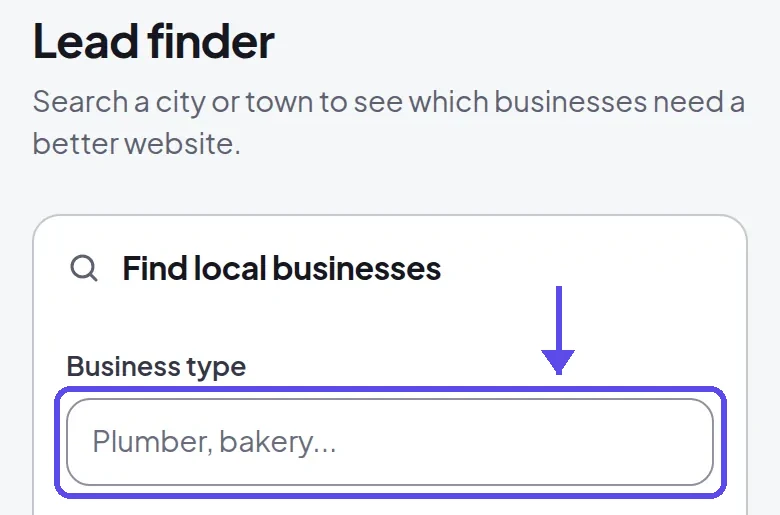
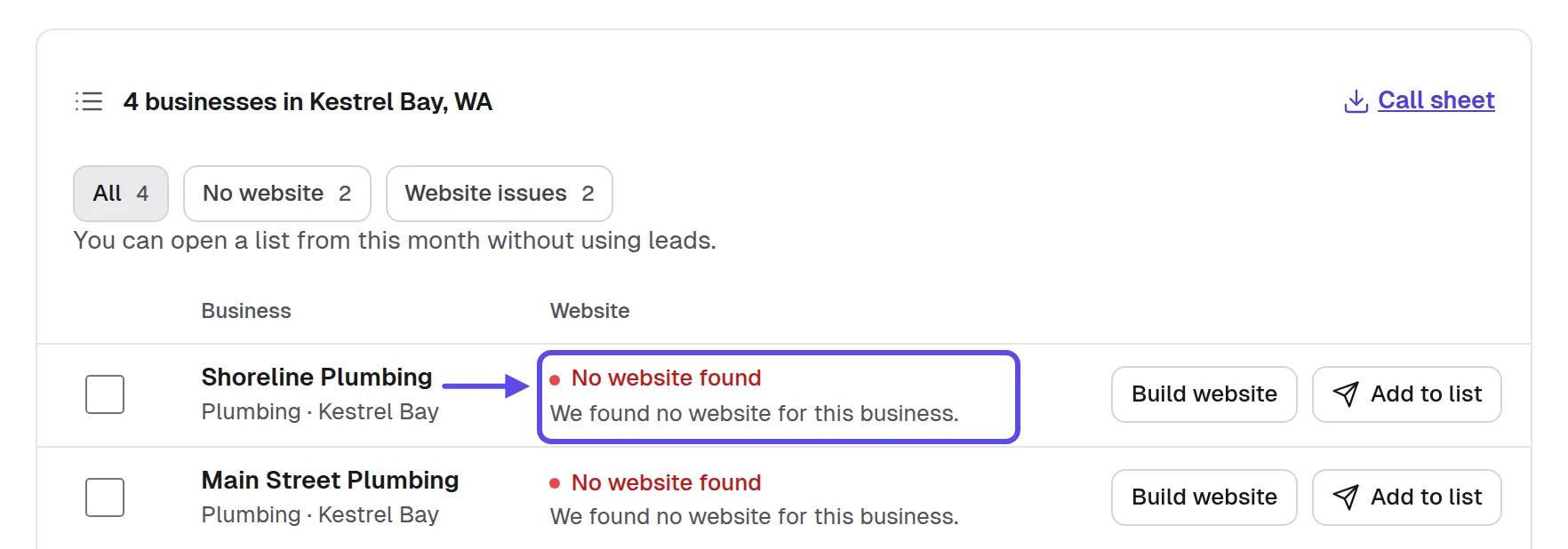
By hand, open each saved listing in Google Maps. No Website button on the listing means a gap. For a site that exists, paste its address into the Wayback Machine to see how long it has looked the same. Then run it through PageSpeed Insights to see how it does on a phone. Write the gap in one short line next to each stop.
- No Website button on the business listing
- The website link opens a social page only
- The site won't open or shows a warning
- The hours online differ from the hours on the door
- The site is hard to use on a phone
Every stop on your route has one gap written next to it, in words the owner would use. Skip any stop where you can't name one. That's how you know this step worked.
Tip
Compare the hours on the listing with the hours on the door as you walk past. A mismatch is a gap the owner fixes the same day they hear about it.
3. Build every website before you leave the house
The visit only works if the website exists. An owner can't picture a website from a description, and they shouldn't have to. Build one for every stop on the route, from the business's own listing and current website: their hours, services and photos. Then the conversation is about their website, not about you. That's why the building happens at home, before the route.
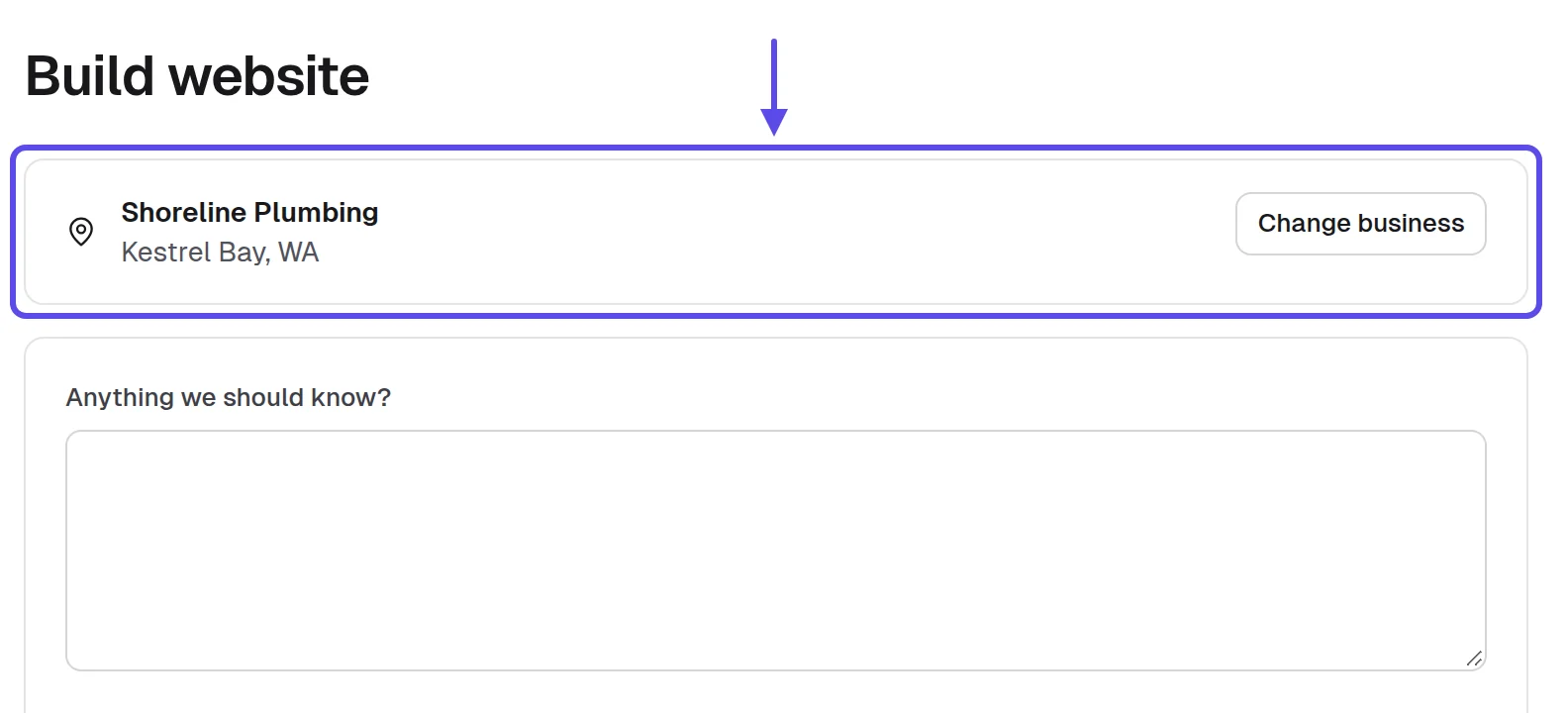
Building the website first used to be bad advice. A site took days, so you couldn't make one for a business that hadn't said yes. That's changed. Of 18 builds on our live service between October 21 and November 3, 2026, 16 finished in under three minutes, and the slowest took about nine and a half minutes. So ten stops usually take well under an hour of building. You can do it the evening before.
Here's what people miss: build for the customer the owner wants more of. A diner wants the lunch crowd, so the hours and the menu sit on the first screen. An auto repair shop wants the phone to ring, so the call button and the services come first.
- The name, phone and address are right
- The hours match the door, not only the listing
- The call button works from a phone
- Nothing on the site was made up
- The gap you'll point to is fixed
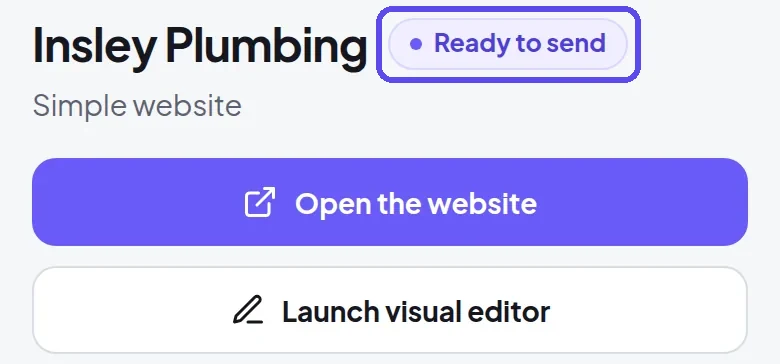
Every stop has a website marked Ready to send. On your own phone, you can find the hours and call the business in ten seconds. When both are true, this step worked.
Tip
Use only what the business published or told you. An owner who spots an invented review or award stops trusting the whole website.
4. Plan the hour you walk in
The same visit gets a yes at three in the afternoon and a brush-off at noon. Owners have quiet hours, and they're different for every business type. The table is a rule of thumb, not a timetable. If you ask, the staff will tell you when the owner is in.
| Business | Usually quieter | Usually avoid |
|---|---|---|
| Restaurants and diners | Mid-afternoon, between lunch and dinner | The lunch and dinner rush |
| Bakeries and cafes | After the morning rush, before closing | Early morning and weekend mornings |
| Salons and barbers | Weekday mornings on their slower days | Evenings and Saturdays |
| Auto repair shops | Mid-morning, after the drop-offs | Opening time and pick-up time |
| Shops and boutiques | Weekday mornings soon after opening | Lunch hours and weekend afternoons |
| Trades on the road | A call to the office first | Walking in unannounced during the day |
Put the visit window in Google Calendar as one block, with the route list in the notes. An afternoon of eight visits is a good first goal. Plan the order so the restaurants come mid-afternoon and the shops after, instead of walking the street in a straight line. That way each stop lands near its quiet hour.
- No visits during a business's busiest hour
- The route ordered by quiet hours
- One block in your calendar for the visits
- A call ahead to trades that work on the road
- Time left at the end for follow-ups
Owners have time to look at your phone for a full minute, and nobody serves a customer while you're mid-sentence. If that's how your afternoon went, you picked the right hours.
Tip
If the place is busy when you arrive, buy something small or come back in an hour. Nobody remembers the visitor who waited, but everyone remembers the one who interrupted.
5. Pack what you bring
You need very little, and everything you bring has a job. Bring a charged phone with every website open in its own tab, so you never search in front of the owner. Add a battery pack, a printed card for each business with their website's address on it, and a way to take notes in the moment.
Put a QR code on each card that opens that business's own website, so the owner can scan it after you leave. Google Chrome's share menu makes a QR code for any page you have open. A card with their own website on it gets kept. A generic business card gets thrown out.
Keep the route in Google Sheets on your phone, with one row per stop. Note the business, the gap you spotted, whether you met the owner, what they said and the follow-up you promised. Write it down on the sidewalk right after each visit, not at home that night, while it's still fresh.
The card you leave
[Business name]'s new website
Made for [Business name] so customers can find the hours and call from a phone. Scan the code or open [Website link].
If you'd like it live, call or text [Your full name] at [your phone number].
[Your full name], [Your business name], [your mailing address]
- Every website open in its own tab
- A charged phone and a battery pack
- One printed card per business, with a QR code
- The route sheet open on your phone
- Clothes you'd wear to meet a client
At every stop, you can show the website within five seconds of saying hello. You also leave something with the business's own name on it. That's how you know you packed well.
Tip
Open each website once on the morning of the visits. A page that loads from memory looks quicker than one loading on a street with weak signal.
6. Say the first thirty seconds well
The first person you meet is often staff, not the owner. Ask for the owner by role, not by a name you found online: "Is the owner in today." If they're out, ask when the owner is usually in, leave the card and write it in your sheet. Never tell staff the whole story. The website is for the person who decides.
Say the gap first, before you say what you do. "I couldn't find your hours online, so I made you a website that shows them" is about their business. "I build websites" is about you. Then stop and hold out the phone, because the website says the rest.
What to say first
Hi, I'm [Your name], and I live nearby. I looked up your diner and couldn't find your hours on my phone, so I made your diner a website that shows them.
It's already built, and there's nothing to pay to look at it. If you can spare a minute, take a look on my phone.
When the owner's out
I made a website for the business, and I'd like to show it to the owner. I'd love to know when they're usually in.
I'd be grateful if you'd pass this card on to them, since it has the website on it.
A note on the card
I stopped by today and made [Business name] a website. It's on the front of this card, and I'll come back on [day], or you can text me any time.
- Ask for the owner by role
- Say the gap in your first sentence
- Hold out the phone, then stop talking
- Ask staff when the owner is usually in
- Leave the card with a note if they're out
Within thirty seconds, the owner is holding the phone and looking at their own business, not at you. When that happens, your opening did its job, and the website can take it from there.

Tip
Say your own name and that you live nearby in the first breath. Owners relax when a stranger becomes a neighbor.
7. Hand over the phone and let them scroll
Once the owner has the phone, the website does the talking. Let them scroll from the top, the way a customer would. Say nothing for the first ten or fifteen seconds. Then point at the one thing you came about: the hours on the first screen, the call button or the menu. Owners decide fast whether it looks like their business.
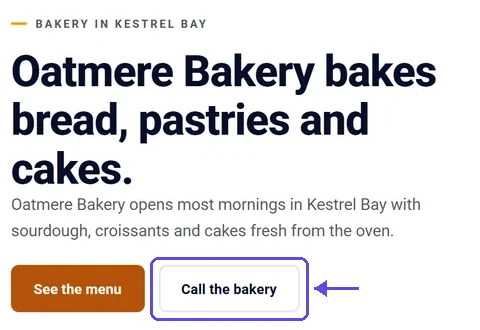
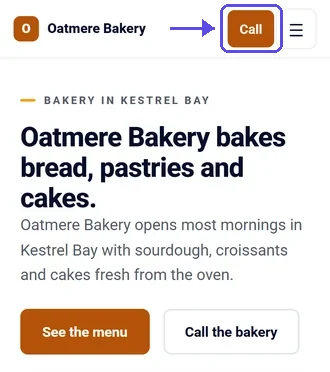
Ask what's wrong with it, not whether they like it. "What would you change" gets a real answer. "Do you like it" gets a polite yes that means nothing. Every change they name is a reason to say yes, because you can make it today. So treat a list of changes as good news, not as a complaint.
If they ask for a change, say it back in their words and make it the same day: "move the hours to the top" or "add the catering page." You describe the change in plain words, and the website updates in a few minutes. Every change is saved as a version you can bring back.
- Hand over the phone with their website open
- Stay quiet for the first ten seconds
- Point at the gap you came about
- Ask what they would change about it
- Write down their words, not yours
The owner has scrolled to the bottom and named at least one change they'd make. You've written it down in their words. That's how you know the handover worked.
Tip
If a customer walks in, hand the phone back and step aside. You can wait, and the owner notices that you did.
8. Answer the objections in the room
In person, you hear the real objection in the owner's own words, and you can answer it before they've finished thinking it. The same six come up again and again. The table gives each one, what it often means and a calm answer. Never argue, and take the first no as the answer.
| The owner says | It often means | You can say |
|---|---|---|
| We already have a website guy | Someone set it up years ago | Offer to leave it so they can compare both on their phone |
| Our customers come by word of mouth | They don't see who searches first | Say people who hear about them often look them up before calling |
| I don't have time for this | They fear a big project | Say it's already built and changes are asked for in plain words |
| How much is it | They're interested | Say your monthly price once, plainly, then stop and wait |
| I need to ask my partner | A real second person decides | Offer to text them both the link and a time to talk |
| Send me an email about it | No for now, or later | Ask for the best address and send the link that day |
Decide your monthly price before the first visit, and say it the same way every time. Our post on what to charge goes through how to choose it. In the room, the price works best said once, followed by quiet. That silence feels long, but let it sit. The owner who's interested asks the next question.
When it sounds expensive
Think about what one new customer is worth to you. The monthly price covers the website, its hosting and any changes you ask for, and you can cancel at any time.
When they say email me
Subject: The website you saw today for [Business name]
Hi [Owner name],
Thanks for looking at the website for [Business name] today at the [counter, shop or garage]. Here it is again: [Website link]
The change you asked for, [the change they asked for], is made. If you'd like it live, reply and I'll send you the link to approve it.
If you'd rather not hear from me, reply "no thanks" and I won't write again.
[Your full name], [Your business name], [your mailing address]
- Hear the whole objection before you answer
- Say the price once, then wait
- Offer the link to whoever else decides
- Take a clear no as the answer
- Write each objection in your sheet
After ten visits, you've heard each objection more than once. Your answer to each one now fits in one calm sentence. That's how you know you're ready for the room.
Tip
Keep a short note on your phone of each objection and the answer that worked. Read it in the car before the next visit, so the answer is fresh when you walk in.
9. Ask for the yes before you leave
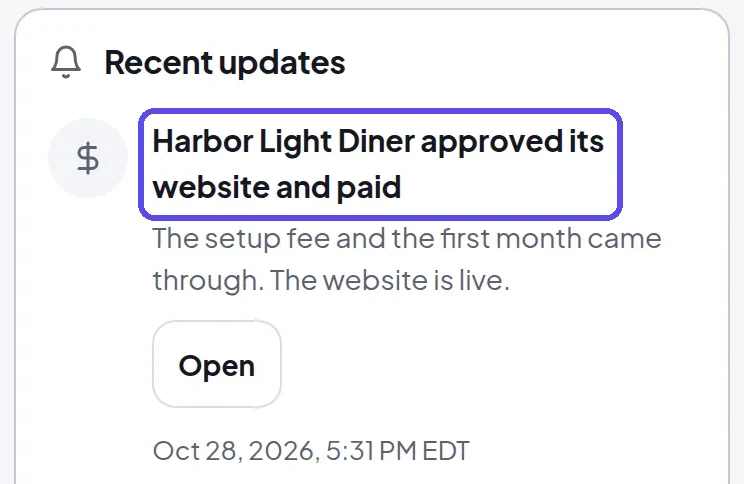
If the owner likes it, ask plainly: "Would you like it live this week." If they say yes, send the approval link by text while you're standing there. It opens a secure card payment page in your name, with your monthly price and any setup fee. Paying is their approval of the exact website they saw. Nothing changes between what they saw and what goes live.
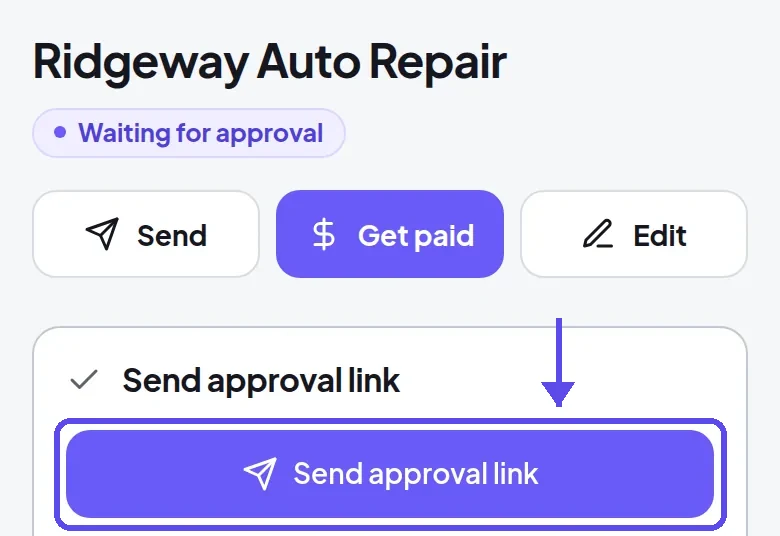
Once they approve, the website goes live at its address in a few minutes. An owner who has a domain connects it in their own login later. If they never approve, the website goes offline 30 days after it was built, so nothing is left hanging. Nobody has to remember to take it down.
An owner who says "let me think about it" often needs a second person or a quieter hour. Send a link from Calendly before you leave, so they pick a ten-minute call that suits them. A booked call is a next step. "I'll think about it" with nothing booked usually isn't.
The approval text
Hi, this is [Your full name] from [Your business name], [your phone number], [your address]. Thanks for looking at [Business name]'s website today. Here's the link to approve it and go live: [Approval link]. Reply STOP to opt out.
- Ask the yes question in plain words
- Send the approval link before you leave
- The price on the page matches what you said
- A booked call for "let me think"
- Tell the owner when it will be live
Every owner who liked the website leaves with an approval link on their phone or a call on their calendar. If nobody who liked it walked away empty-handed, this step worked.
Tip
If they're ready, help them approve it while you're there. A yes cools by the next morning.
10. Follow up the same day and log every visit
The visit isn't over when you walk out. That evening, send each owner you met one short message with their link and the change you promised. For owners who were out, send the card's link with a short note. Write every stop in your sheet or the app while you still remember the faces.
For an owner you missed twice, record a short screen video with Loom. Scroll their new website on a phone and say the business name in the first five seconds. Then send it with the link. Owners often watch a short video about their own business, and the next visit starts warm.

In the United States, the FTC's compliance guide to the CAN-SPAM Act says a commercial email must include your valid physical postal address and a clear way to opt out, and opt-out requests must be honored within 10 business days. 5
The follow-up email
Subject: [Business name]: the website from my visit
Hi [Owner name],
I'm [Your full name] from [Your business name]. I stopped by [Business name] today and left a card with the website I made for you.
Here's the link again, and it works on a phone: [Website link]
If you want it, I can put it live this week and look after it every month.
If you'd rather not hear from me, reply "no thanks" and I won't write again.
[Your full name], [Your business name], [your mailing address]
The same-day text
Hi, this is [Your full name] from [Your business name], [your phone number], [your address]. Good to meet you at [Business name] today. Here's the website with the change you asked for: [Website link]. Reply STOP to opt out.
A week after it's live
Hi [Owner name], I'm checking that the website is working for you and that messages from it are reaching you. If you'd like a change, send it any time. And if a neighbor or a friend's business needs a website, I'd be glad to make them one to look at.
- A message to every owner you met
- The promised change made before you send it
- Every stop logged with what the owner said
- One follow-up at most, a few days later
- A short video for owners you missed twice
By the end of the evening, every stop has a row and every owner you met has their link. You also know which street you're walking next. That's a finished visit day.
Tip
After a website goes live, ask the owner who else on the street they know. A word from the shop next door opens the next door.
Rules to know before you walk in
Selling in person can need a local permit or license. The SBA's guide to licenses and permits says the requirements and fees vary with your business activities, your location and the government's rules, so the answer for your own town is the one that counts. 6
Your visits are to businesses open to the public, during their opening hours, never to homes. So the question for your town is whether its rule on selling in person covers a visit like that, and whether you need a permit for it.
You can check this in one afternoon. Search your city's and county's published code for three words: solicitor, peddler and canvasser. Then email the city or county clerk and ask, so the answer is in writing. Keep that email with your notes.
If you work under a business name that isn't your own name, the SBA's guide says you may need to register it as a DBA, also called a trade name or assumed name, with your state, county or city. That's the name on the card you leave. 6
Asking the clerk
Subject: A permit question about visiting local businesses
Hello,
I'm [Your full name] from [Your business name], and I plan to visit businesses on [street or area] during their opening hours to show owners websites I made for them. I sell to businesses only, never to homes.
Please let me know whether this needs a solicitor's or peddler's permit or a registration in [city or county], and if it does, how to apply and how long it takes.
[Your full name], [Your business name], [your phone number]
- Respect every No Soliciting sign, and leave when an owner or manager asks you to.
- Walk in only during opening hours, through the customer door, never through a back entrance.
- Never block a customer, a register or a doorway while you show the website.
- Every follow-up email carries your postal address and a clear way to opt out.
- Every text names you and your business and lets the owner reply STOP.
- Stop at any no, and don't come back unless the owner asks you to.
None of this is legal advice. It's how you stay welcome on a street you'll want to walk again next month. When a rule is unclear, the clerk's office is the place to check, and a written answer is worth keeping.
How to know it's working
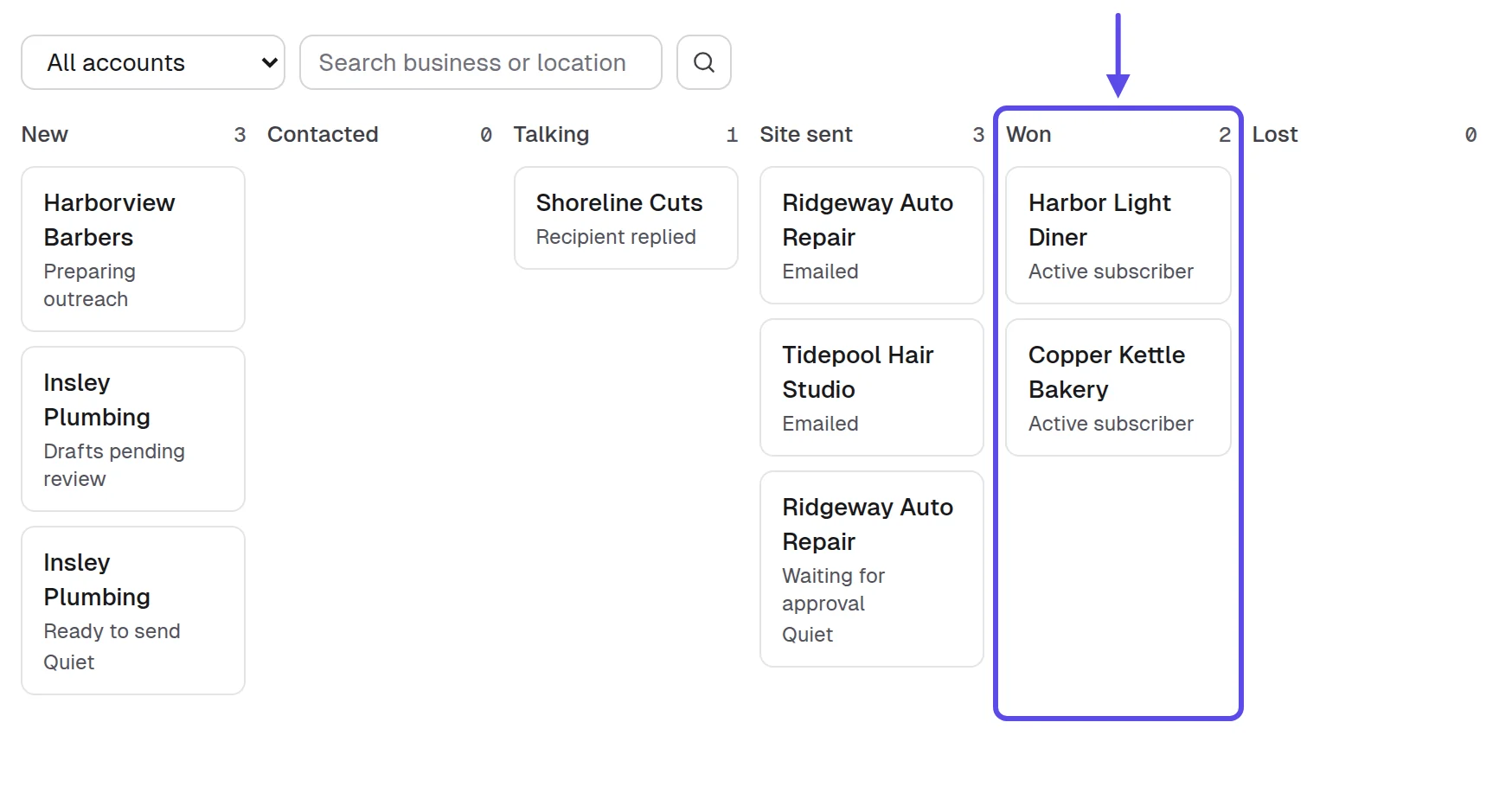
After every visit day, count a few things in your sheet or the app's Pipeline. There are no figures to hit and no targets here. These are things to count so you can see what to change next time.
- The visits: how many businesses you walked into that day
- The owners met: how many times you spoke to the person who decides
- The shows: how many owners scrolled their own website on a phone
- The yeses: how many approved on the spot or after the follow-up
- The objections: which ones came up, and which answer worked
- The streets: which route gave you the most owners at the counter
If you rarely meet owners, change the hour you walk in. If owners see it and say no, change what you built or how you show it. If they say yes in the room and never approve, send the approval link before you leave. Our honest look at the question "does selling websites work" covers the signs to keep going or change course.
A visit day works best alongside the other ways to find web design clients. That way, the businesses you can't reach in person still hear from you this week. Walk the streets close to you, and send short messages to the rest.
Frequently asked questions
Does selling websites in person work?
Yes, for local businesses near you, when you walk in with their website already built and show it on their phone. It takes more time per business than email, and it tells you much more about what the owner thinks. Many owners say no, and that's normal. A no is part of every visit day.
Do I need a permit to sell websites door to door?
It depends on the city or county, since some require a permit or a registration for selling door to door and others don't. Ask your city or county clerk before a day of visits, and check the SBA's guide to licenses and permits to see where local licenses come from.
What should I bring when I visit a business?
Bring a charged phone with their website open, a battery pack and a printed card with their website's address and a QR code. Add a way to take notes on the spot. You don't need anything for the owner to sign.
What time of day is best to visit a local business?
Visit in their quiet hour, which differs by business type: mid-afternoon for restaurants, mid-morning for auto repair shops and weekday mornings for salons. Avoid any rush, when the owner can't look up. If you're unsure, ask the staff when the owner is usually in, and come back then.
Should I build the website before I walk in?
Yes, because an owner judges a finished website on a phone in seconds, while a description of one gets a polite no. If they never approve it, the website goes offline 30 days after it was built, so nothing is left hanging.
What if the owner isn't there?
Ask the staff when the owner is usually in, leave a card with their website and a short note, and write the visit in your sheet. Then come back at that hour, or send the link with a short video that evening so they can look when they have a minute.
Is it better to email or visit a business about a website?
Visit the businesses close to you, and email the ones you can't reach this week. A visit tells you more about what the owner thinks, and email reaches more businesses. Every email you send needs your postal address and a clear way to opt out.
Sources
- US Census Bureau, “Census Bureau Statistics Shed Light on Self-Employment by Sector and State During Small Business Week” (May 6, 2025), on the 2022 Nonemployer Statistics and County Business Patterns
- Clutch, “83% of small businesses now have a website” (press release, August 21, 2025)
- Ironstone, Lead finder’s checks for partners, October 19 to November 6, 2026: 460 local businesses in 6 towns and 30 business types, from our own records read November 10, 2026
- CX Dive, “Customers back up their initial searches for local businesses with reviews” (July 11, 2025), on a survey of more than 1,000 US consumers
- Federal Trade Commission, CAN-SPAM Act: A Compliance Guide for Business
- US Small Business Administration, “Apply for licenses and permits” (business guide)