 Ironstone
Restoring previous website versions
Ironstone saves website changes as separate versions for 90 days, so you can restore any previous version in one click.
Steps
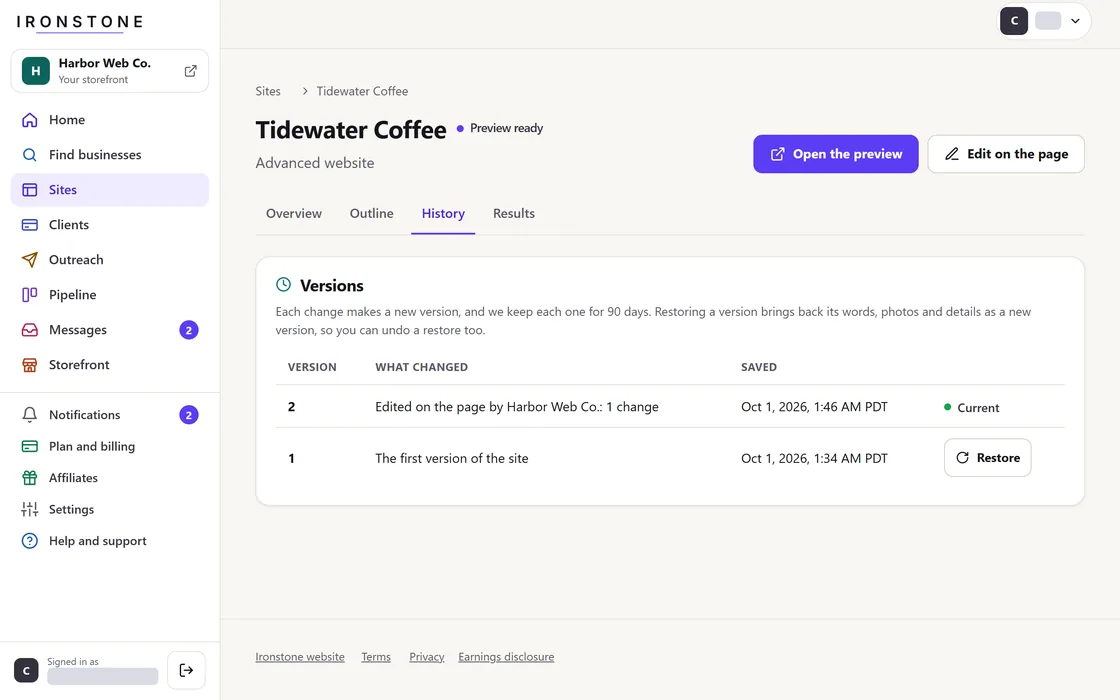
- Navigate to the site details page in your partner dashboard, or instruct your client to log into their account.
- Find the version you want under Version history, where every change is listed with a short summary.
- Click Restore to immediately revert the site to that selected revision.
Restoring a website creates a new saved version, so you can undo it anytime. Restoring uses no AI credits.
Frequently asked questions
What if the required version is older than 90 days?
Version history is retained for exactly 90 days, making older revisions unrecoverable.
What should I do if the wrong version was restored?
To undo a restore, restore the version saved right before it.
Related guides
Screens and businesses shown are fictional.